4 posts tagged with "widevine"

View All Tags

We recommend Microsoft Edge

· 2 min read
Joseph Simmons
Joseph Simmons
Senior Software Engineer

At this stage, we recommend that you use Microsoft Edge, which can load local browser extension. This allows WhaleDown to download Widevine encrypted videos.

The background

Google Chrome version 142 disables loading browser extensions from the local drive. This has caused great inconvenience to WhaleDown users.

As mentioned in a previous blog post, We have Chromium built in the macOS version in version 2025.11.4. However, our tests revealed that this is not a good solution. While Chromium can load native browser extensions, it lacks built-in video codecs and does not support Widevine.

The solution

Further testing revealed that Microsoft Edge, which uses the same browser engine as Chrome, can not only load local browser plugins, but also supports Widevine very well.

Our users can download more encrypted videos simply by switching to Microsoft Edge. At least for now, this is an effective solution for macOS users of WhaleDown.

What's next

The upcoming version 2025.12.0 will no longer include any browser. We recommend that you manually download Microsoft Edge and install it in the default location.

Our developers are preparing to release the browser extension to the Google Web Store. This will completely eliminate the limitation that Google Chrome 142+ cannot load browser extensions locally.

WhaleDown 2025.06.0

· One min read
Joseph Simmons
Joseph Simmons
Senior Software Engineer

We're excited to release WhaleDown 2025.06.0. This release brings some important bug fixes.

What's new

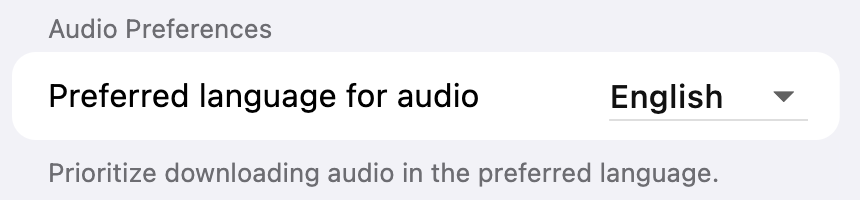
For video streams with audios in multiple languages, you can now select the language you want to download.

Before starting the download, you'll need to change the prefered audio language on the download settings screen.

DRM Snowflakes

Also, we've fixed a bug where Hotmart videos couldn't be downloaded. You can now save videos of online courses hosted on Hotmart.

What's next

We have received feedback from users that they are unable to change the download directory in downloader settings screen. This bug has been fixed. The next version 2025.06.1 will ship with this bug fix.

WhaleDown for Desktop 2025.05.0

· 2 min read
Joseph Simmons
Joseph Simmons
Senior Software Engineer

We're excited to release WhaleDown for Desktop 2025.05.0. This is an important release worth updating.

From now on, we will be releasing the desktop version and Android version simultaneously.

What's new

This version brings the ability to decrypt/preview DRM protected videos in real time. You don't need to wait for the video download to finish to decrypt and preview DRM-protected videos. This feature is more friendly to users who haven't purchased a license.

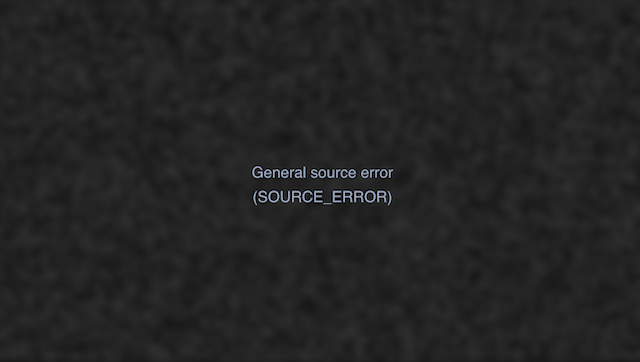
If you see the following screen in your browser, the WhaleDown browser extension is working. At this point, you just go back to the Detector and click on the item you want to download.

DRM Snowflakes

Additionally, we've added a right-click menu to Detector. We've also added a “Download Later” menu item based on user suggestions. In this case, the video is added to the schedule queue instead of being downloaded immediately.

We've also fixed a number of bugs in version 2025.05.0. Please read Changelog for more details.

What's next

WhaleDown's support for DRM technology is still in its early stages. In addition to addressing the issues mentioned in the previous blog, we're also preparing a user interface (UI) for the browser extension to help users download videos better.

WhaleDown for Desktop 2025.04.0

· 2 min read
Joseph Simmons
Joseph Simmons
Senior Software Engineer

We're excited to release WhaleDown for Desktop 2025.04.0. This release brings the long-awaited Digital rights management (DRM) support.

What's new

To decrypt DRM-protected videos, we've introduced a brand new browser extension - Video Detector Helper. You won't feel it at all though, because WhaleDown automatically installs and enables it.

With the help of this extension, WhaleDown supports downloading videos from more websites.

tip

To load this browser extension, WhaleDown will try to enable the browser's developer mode. If the extension doesn't load automatically, enable it in chrome://extensions/ manually.

Limitations

  1. When a video in a web page uses DRM (Windvine) technology, it may not play on the web page. The video player usually says “Video source error”.

  2. Currently, WhaleDown only decrypts DRM-protected videos after the download is complete. You are unable to preview the video you are downloading in real time.

  3. WhaleDown currently only supports decrypting DRM-protected videos on Windows and macOS. Also, currently only Google Chrome has good support for the WhaleDown browser extension.

  4. There are a variety of DRM protection techniques on the market. For now, only Widevine is supported by WhaleDown.

What's next

We're looking forward to introducing DRM-protected Video Preview feature in the next release. Additionally, we intend to add a simple user interface (UI) to the browser extension.