Getting Started
What is Detector
Detector
is the core module for WhaleDown to discovervideo/audio links. Some video downloaders use browser extensions to get download links. In contrast, Detector can seamlessly obtain video links in the browser.
As a bridge between Browser and Downloader, Detector has the following unique features,
- Integrate yt-dlp and surpass yt-dlp. In particular, Detector can find video links of websites that need to be logged in.
- Thanks to the
rules engine, WhaleDown can detect more video links than any other video download softwares. - By forwarding more browser data to the downloader, WhaleDown can download more protected videos than others.
Facets
Unlike the Downloader, you need to know the following facts about Detector,
- The data of Detector is stored in memory.
- When WhaleDown starts, Detector's data list is empty.
- When WhaleDown exits, the data in Detector is immediately lost.
- The detector data list is sorted in chronological order.
- The video found first will be displayed below the detector list.
Basic Usage
1. Download Directly
When the detected video/audio has only one resolution, you can click the download button
to download it directly.2. Choose Formats
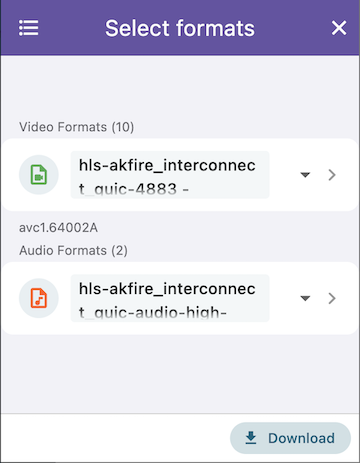
If the video contains multiple resolutions/formats, or audio in multiple different languages, WhaleDown will let you select the appropriate resolution or audio in a certain language through a dialog before downloading.
3. Clear List
If the Detector contains too many items, you can clear the list using action
Clear All in the top-right corner menu .
Emptying Detector won't delete your data. If you revisit the page containing the video, Detector will detect the video link again.
What's Next
Whether you can't find video/audio links on a web page, detect too many links, or the video resolution issue, please read the following Troubleshoot documentation.